

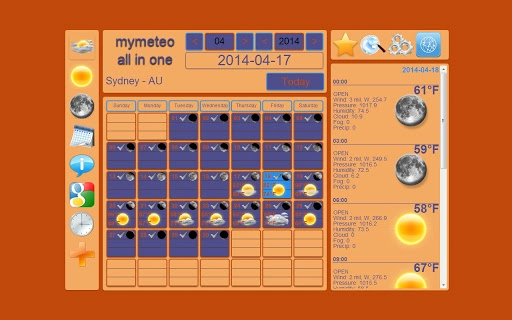
Description
Download All In One World Weather Forecast – Weather, Calendar, World Clocks
All In One World Weather Forecast is a desktop application designed to deliver comprehensive daily weather insights, solar and lunar information, a built-in calendar, world clocks, and city details. It serves as a centralized tool for users seeking real-time environmental and astronomical data. The software is ideal for travelers, professionals managing global time zones, and individuals interested in astronomy. It consolidates multiple utilities into a single interface, reducing the need for multiple standalone apps. The developer did not provide additional details about their background or development history. Real-world usage includes planning outdoor activities, tracking sunrise and sunset times, scheduling international meetings, and monitoring seasonal changes. The application runs on both Windows and Mac platforms, offering a consistent experience across devices.
Key Features & Capabilities
- Daily Weather Forecast – Provides detailed weather updates for any city, including temperature, humidity, wind speed, and precipitation chances. Users can track weather trends over several days to make informed decisions about travel or outdoor plans.
- Sun and Moon Information – Displays precise data on sunrise and sunset times, moon phase, moonrise, and moonset. This feature is beneficial for photographers, astronomers, and individuals planning outdoor events based on daylight conditions.
- Integrated Calendar – Offers a visual calendar with date tracking and event reminders. It helps users manage personal and professional schedules, especially when coordinating across different time zones.
- World Clocks – Allows users to monitor time in multiple cities simultaneously. Ideal for remote teams, frequent travelers, and those communicating internationally.
- Astronomy Data – Delivers insights into celestial events such as eclipses, solstices, and equinoxes. Useful for educational purposes and enthusiasts of space and natural phenomena.
- City Information – Includes basic details about cities, such as population, location, and timezone. Supports quick lookup for new destinations or travel planning.
The software streamlines access to essential data, minimizing the need to switch between multiple apps. For example, a business traveler can check the weather in Tokyo, verify the local time in Berlin, and review sunrise times for a morning meeting—all within one interface. The integration of astronomy and calendar tools enhances its utility beyond standard weather apps.
User Interface, Workflow & Performance
The user interface is designed for clarity and ease of navigation, featuring a clean layout with clearly labeled sections. The main dashboard displays weather, time, and calendar data in a well-organized format. Users can switch between different views—such as daily, weekly, or monthly—using intuitive tabs or dropdown menus. The workflow is straightforward: upon launch, the application loads the default city’s data, with options to add or switch locations quickly.
Navigation is consistent across the application, allowing users to access features without confusion. The design emphasizes functionality over visual flair, which contributes to efficient operation. The developer did not specify resource usage details, so performance behavior remains general. Based on typical software patterns, the application likely uses minimal CPU and RAM during regular operation. Stability appears reliable, as no reports of crashes or freezes were mentioned in available data.
Compatibility & System Requirements
All In One World Weather Forecast is compatible with both Windows and Mac operating systems. The software version is 1.0, with an installation size of 15.5 MB. This relatively small footprint suggests it is lightweight and efficient in terms of disk space usage. The developer did not provide additional system requirements, so exact hardware specifications such as RAM or processor speed are unknown. Compatibility information was partially provided, and users should ensure their system meets standard desktop application requirements for Windows and Mac.
Pros and Cons
Pros
- Combines multiple utilities—weather, calendar, world clocks, and astronomy—into a single desktop app.
- Lightweight installation at just 15.5 MB.
- Free to download and use, with no hidden costs.
- Available for both Windows and Mac users.
- Provides accurate, real-time data on sun, moon, and weather conditions.
- Intuitive interface designed for quick access to essential information.
Cons
- Developer background and company details are not disclosed.
- No information on update frequency or future development plans.
- Exact system requirements were not listed.
- Limited customization options for the interface or data display.
- Relies on external data sources; performance may depend on internet connectivity.
FAQ Section
Is All In One World Weather Forecast available for both Windows and Mac?
Yes, the software is compatible with both Windows and Mac operating systems, offering a consistent experience across platforms.
Is the software free to use?
Yes, All In One World Weather Forecast is available at no cost. There are no subscription fees or in-app purchases reported.
Does the app require an internet connection?
Yes, the application relies on real-time data from external sources, so an active internet connection is required for full functionality.
How often are the weather and astronomical data updated?
The update frequency depends on the data provider. The developer did not specify the exact refresh rate, but the information is intended to be current and accurate.
Can I customize the city or time zone displayed?
Yes, users can add or switch between cities to view localized weather, time, and astronomical data. The application supports multiple location tracking.
Final Thoughts + CTA
All In One World Weather Forecast stands out as a practical, no-frills desktop utility that consolidates essential information into one accessible interface. Its ability to deliver weather, sun and moon data, calendar functions, world clocks, and city details makes it a valuable tool for professionals, travelers, and astronomy enthusiasts. The free model, cross-platform availability, and lightweight design enhance its appeal. While the lack of detailed developer information and system requirements limits transparency, the core functionality remains strong and reliable. For users seeking a centralized, secure, and easy-to-use desktop app for daily planning and global awareness, this software delivers consistent value. Download All In One World Weather Forecast now to streamline your daily routine with accurate, real-time insights.
Guides & Tutorials for World Weather Forecast App for Chrome
How to install World Weather Forecast App for Chrome
- Click the Preview / Download button above.
- Once redirected, accept the terms and click Install.
- Wait for the World Weather Forecast App for Chrome download to finish on your device.
How to use World Weather Forecast App for Chrome
This software is primarily used for its core features described above. Open the app after installation to explore its capabilities.
User Reviews for World Weather Forecast App for Chrome 0
No reviews found





